
Account Deletion Policy
Steps to Delete Your Account
You can permanently delete your account directly inside the app:
- Open the app and log in
- Go to Settings
- Tap Delete Account
- Enter your account password to confirm
- Tap Delete to finalize
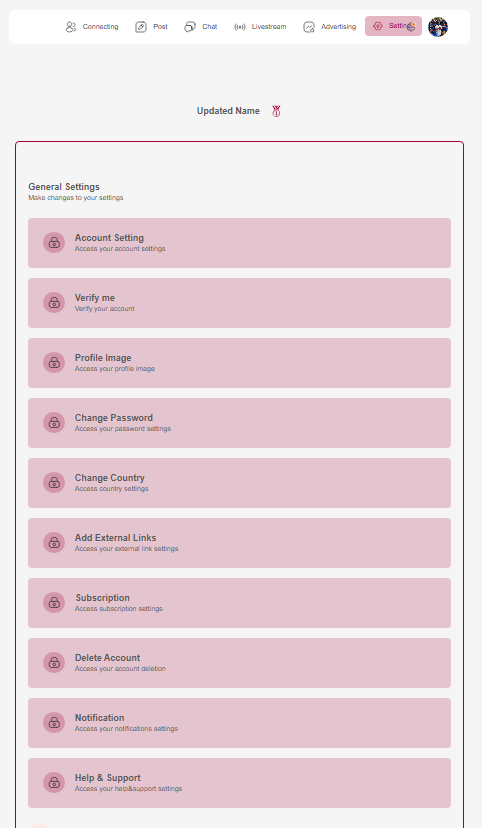
Settings Page
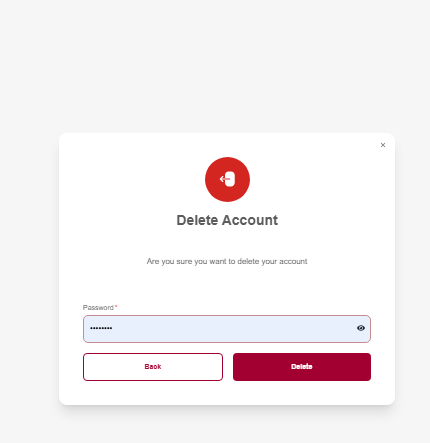
Delete Account Page
Important: Once confirmed, your account and personal data will be permanently deleted.
What Happens When You Delete Your Account
Data That Will Be Deleted:
- Profile information
- Username & display name
- Profile photo
- Posts, comments, and social interactions
- Messages
- Followers and following associations
- Device identifiers
- Any analytics tied to your user record
Data That May Be Temporarily Retained:
(only when required for legal, fraud-prevention, or security reasons)
- Transaction history (if financial activity exists)
- Audit logs (max 30 days)
After this period, these are also permanently removed.
Data Retention Timeline
- Standard user data: deleted immediately
- Security & legal-required data: deleted within 30 days
Account Recovery
After deletion, accounts cannot be recovered.
Users must register again as a new user.
Support
If you need help deleting your account or have privacy/data questions, contact:
Legal Notice
Account deletion is governed by our Terms of Service and Privacy Policy. By deleting your account, you acknowledge that:
- The deletion is permanent and irreversible
- Some data may be retained for legal compliance as outlined above
- You will lose access to all premium features and subscriptions
- Any pending transactions or disputes must be resolved before deletion
For more information about data handling, please review our Privacy Policy and Terms of Service.